 Sell By Chat
Why your LinkedIn copilot should never press Send
Auto-sending tools save a few seconds and put your account and reputation at risk. We built Sell By Chat the other way.
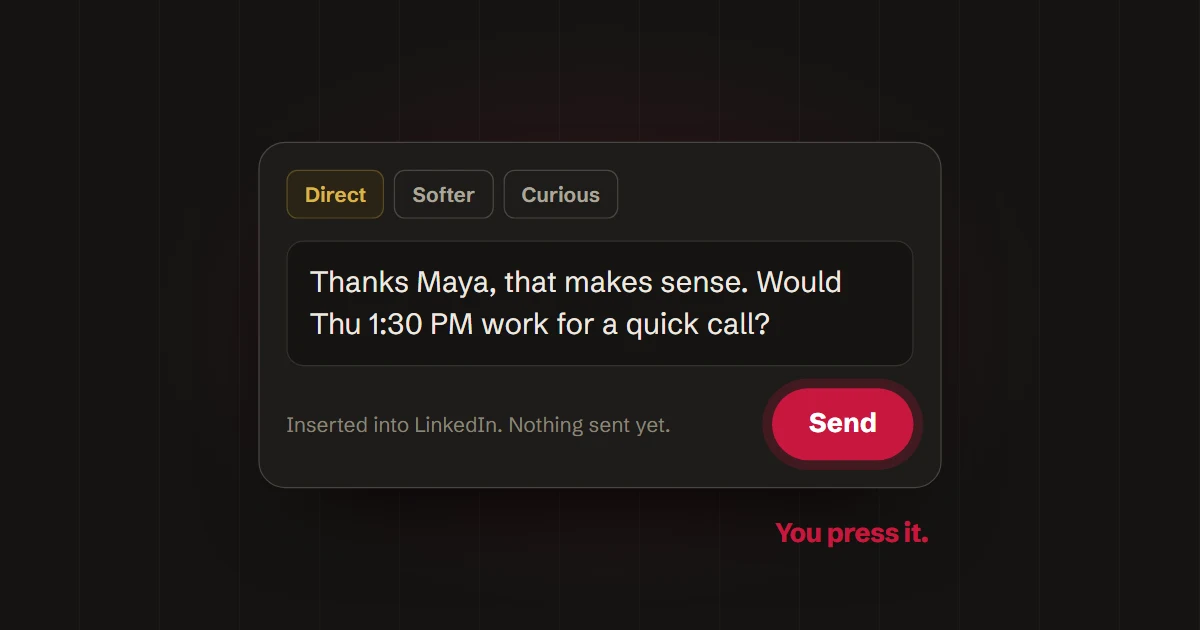
Plenty of LinkedIn tools will comment, like and reply for you. It feels efficient until a prospect gets a message that misses the point of what they said, or LinkedIn flags the account for automated activity.
You stay in the conversation
Sell By Chat drafts and you decide. You can edit a word, switch from Direct to Softer, or skip the suggestion entirely. Insert puts the text in LinkedIn's message box and stops there.
It only reads what you open
The extension reads the conversation or profile in front of you and the inbox rows you explicitly ask it to check. It doesn't crawl your network or run in the background.
Your data stays limited
- Complete conversation histories aren't stored by default, only summaries and extracted facts.
- Voice examples and Google tokens are encrypted.
- You can delete your account and data from Settings at any time.
A few saved seconds aren't worth a lost deal or a restricted account. Keeping Send in your hands is the point.