They replied. Now what?
Sell By Chat sits beside your LinkedIn inbox. It reads the thread, writes your next message for the stage the deal is in, and books the call on your Google Calendar. You review it. You press Send.
- 25 free drafts a month
- No credit card
- Never sends on its own

What would a good month look like for you?
Honestly, 4 new clients a month. Mostly referrals right now.
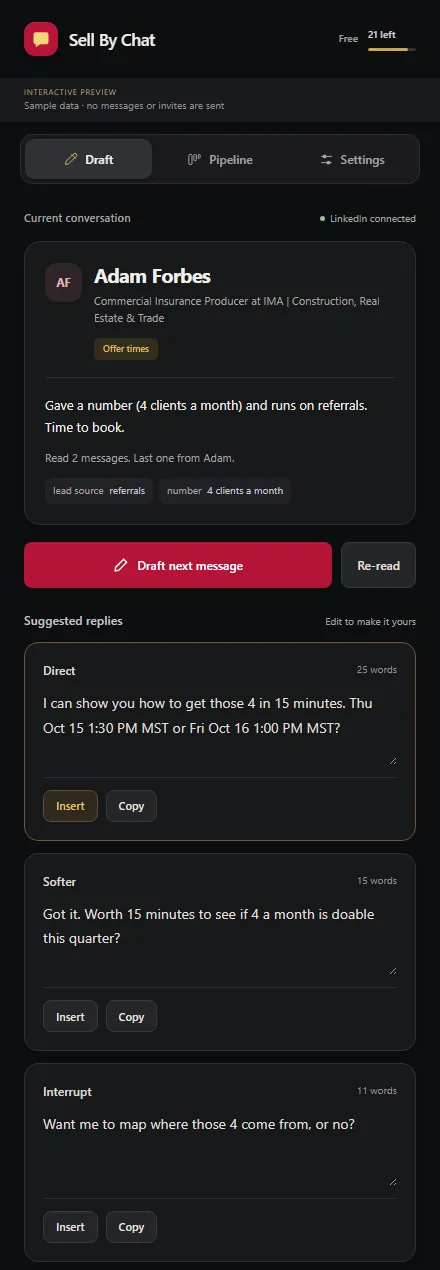
Offer timesGave a number. Offer two times.
Every reply is written for where the deal is.
The panel reads the whole thread, works out the stage, and drafts the move that gets you to the next one.
Qualifying
They're curious. The draft asks one question that gets a concrete goal.
Objection
They push back. The draft handles it before asking for anything.
Offer times
They gave a number. The draft ties the call to it and offers two open slots.
Confirming
They picked a time. The draft locks it in and asks for the best email.
Booked
Invite sent. A real Google Calendar event with a Meet link.
Nurture
Not now. The draft keeps it warm without pushing.
Built for the inbox, not the feed.
Most LinkedIn AI tools help you post more. Sell By Chat helps you close the conversations you already have.
Three replies, each one short enough to send.
Pick Direct, Softer or Interrupt, change any word, and insert it into LinkedIn's message box.
- Re-read after they reply to get a fresh read of the thread.
- Paste or upload a conversation from a PDF or screenshot.
- Word counts on every draft keep messages DM-length.
A pipeline you never have to update.
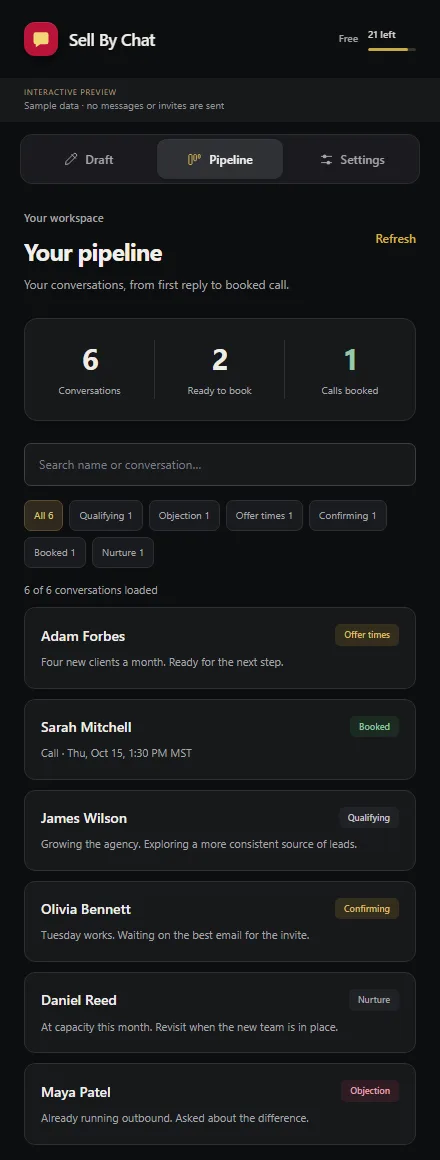
Every thread you open lands in your pipeline with its stage and a one-line summary.
- Today and Inbox show who needs a reply and who is ready to book.
- Results show how threads move from first reply to booked call.
- Team lets workspace owners see results across sellers.
Sounds like you. Books like you.
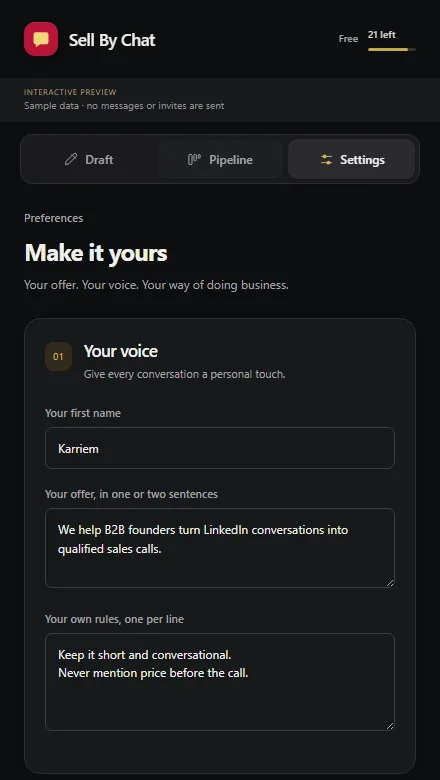
Tell it your offer and your rules once. Set call length, working days, buffer and notice, and it only offers times that work for you.
- Learn your voice from 10 to 20 of your own conversations that worked.
- Your rules, like "never mention price before the call", apply to every draft.
- CRM sync sends booked contacts to HubSpot, Notion or Google Sheets.
It never presses Send.
Your account stays safe
Nothing goes out automatically, so there's no bot activity for LinkedIn to flag.
Your name stays on it
You read every message before a prospect does. Edit it, swap the style, or skip it.
Your data stays small
It keeps summaries and stages, not full chat histories. Voice examples and Google tokens are encrypted.
- Why we built it this way
Sell By Chat or DePost AI?
DePost AI helps you write posts and engage on the feed. Sell By Chat turns DM conversations into booked calls. Pick the one that fixes where you're stuck.
| Feature | Sell By Chat | DePost AI |
|---|---|---|
| Main job | Close DM conversations into calls | Create posts and engage on the feed |
| DM reply drafts | Yes, three styles, tuned to the deal stage | Yes, AI-assisted replies |
| Books the meeting | Yes, live Google Calendar slots and invites | Not listed |
| Deal stages | Qualifying, Objection, Offer times, Confirming, Booked, Nurture | Cold, Warm, Won |
| CRM sync | Yes, HubSpot, Notion, Google Sheets | Not listed |
| Sending | You press Send on every message | Engages in the browser on your behalf |
| Post writing | No, not what it's for | Yes, with scheduling |
| Price | Free, 25 drafts a month | $39/mo promo ($59 list), 7-day trial |
DePost AI details come from its public descriptions in October 2026 and may have changed. Check their site for current features and pricing.
Start free. Stay free if it's enough.
Free, available now
- 25 reply drafts every month
- Google Calendar booking and invites
- Pipeline with stages and results
- Your voice, offer and rules
- HubSpot, Notion and Sheets sync
Pro, coming soon
- Everything in Free
- A higher monthly draft limit
- For sellers running many threads at once
We'll publish pricing before checkout opens.
Notes on selling in the DMs
- Playbook
From reply to booked call in three messages
Most threads stall because the seller asks for the meeting too early or too late. Here's the order that works.
- Product
Why your LinkedIn copilot should never press Send
Auto-sending saves a few seconds and puts your account and reputation at risk.
- Comparison
Sell By Chat or DePost AI: which fits you?
Both use AI on LinkedIn. The right pick depends on where your pipeline is stuck.
Before you install
Does it send messages for me?
No. It drafts replies and can insert one into the LinkedIn message box. You always press Send yourself.
Which browsers does it work in?
Chrome 116 or newer on desktop. It opens as a side panel next to LinkedIn.
What does it need access to?
LinkedIn pages you open, your Google sign-in, and Google Calendar so it can check availability and create the calls you ask for.
Is my conversation data stored?
The app keeps summaries, extracted facts, stages and booking details. Complete conversation histories aren't stored by default.
What happens after 25 drafts?
Your count resets each month. Booking calls and the pipeline keep working.
Can I connect my CRM?
Yes. Booked conversations sync to HubSpot, Notion or Google Sheets when you choose to send them.
Set up in about a minute.
Install it, sign in with Google, and open your next LinkedIn conversation.
Free. Version 1.9.1 for Chrome 116 or newer on desktop.
- Download and unzipRight-click the file, choose Extract All, and keep the folder somewhere permanent, like Documents. Chrome runs the extension from that folder.
- Turn on Developer modeType
chrome://extensionsin the address bar and switch on Developer mode in the top right. - Load the folderClick Load unpacked and choose the folder you unzipped.
- Pin and sign inPin Sell By Chat from the puzzle-piece menu, open it, and sign in with Google.
- Open a LinkedIn messageClick the icon, then Draft next message. To update later, replace the files in the same folder and click Reload.
- Add to ChromeConfirm in the Chrome Web Store.
- Pin the iconOpen Chrome's puzzle-piece menu and pin Sell By Chat.
- Sign in with GoogleThis lets the panel check your calendar and send invites.
- Open a LinkedIn messageClick the icon, then Draft next message.